LinkedIn Ads Without the Waste: The Practical Guide We Hand to New Clients
LinkedIn ads are expensive per click and worth it only when the right people see the right offer and sales follows up properly. This is the guide we give new B2B and SaaS clients before we spend a penny.
Key takeaways
- LinkedIn ads cost more per click than most platforms, so judge them on pipeline and revenue, not on cost per lead.
- Targeting is the platform’s real advantage. Build audiences from job function, seniority and company lists, and keep them big enough to deliver.
- Lead gen forms bring volume, landing pages bring intent. Most B2B accounts need both, with different offers for each.
- Budget for learning. Small daily budgets spread across many campaigns rarely produce enough data to optimise.
- The campaign ends in your CRM. Fast follow-up, lead scoring and sending outcomes back to LinkedIn decide whether the spend pays.
01Why linkedin ads are different from every other platform
Most platforms know what people buy, watch and search for. LinkedIn knows what people do for a living: their job title, seniority, employer, industry and company size, kept reasonably up to date by the users themselves. That is why linkedin ads remain the first choice for B2B marketers, and also why they cost more. You are paying for precision that Google and Meta cannot fully match.
The mistake we see most often is treating LinkedIn like Meta with a suit on. Brands bring the same cheap lead magnet, the same aggressive cost per lead targets and the same expectation of quick wins. Then they are disappointed when leads cost several times more and half of them never answer the phone. LinkedIn works on a different clock. B2B deals involve several people, long consideration and a sales conversation, and the ads need to be planned around that reality.
When our LinkedIn ads management team takes on a new account, we start by asking three questions: what is a customer worth over their lifetime, how long does a typical deal take to close, and what happens to a lead in the first 24 hours after it arrives. The answers decide everything else in this guide.
02LinkedIn ads targeting: building audiences that actually buy
Targeting is the reason you are on the platform, so it is worth doing carefully. We build every audience from a simple question: who signs the contract, who influences it, and who uses the product? Those are often three different job titles, and they need different messages.
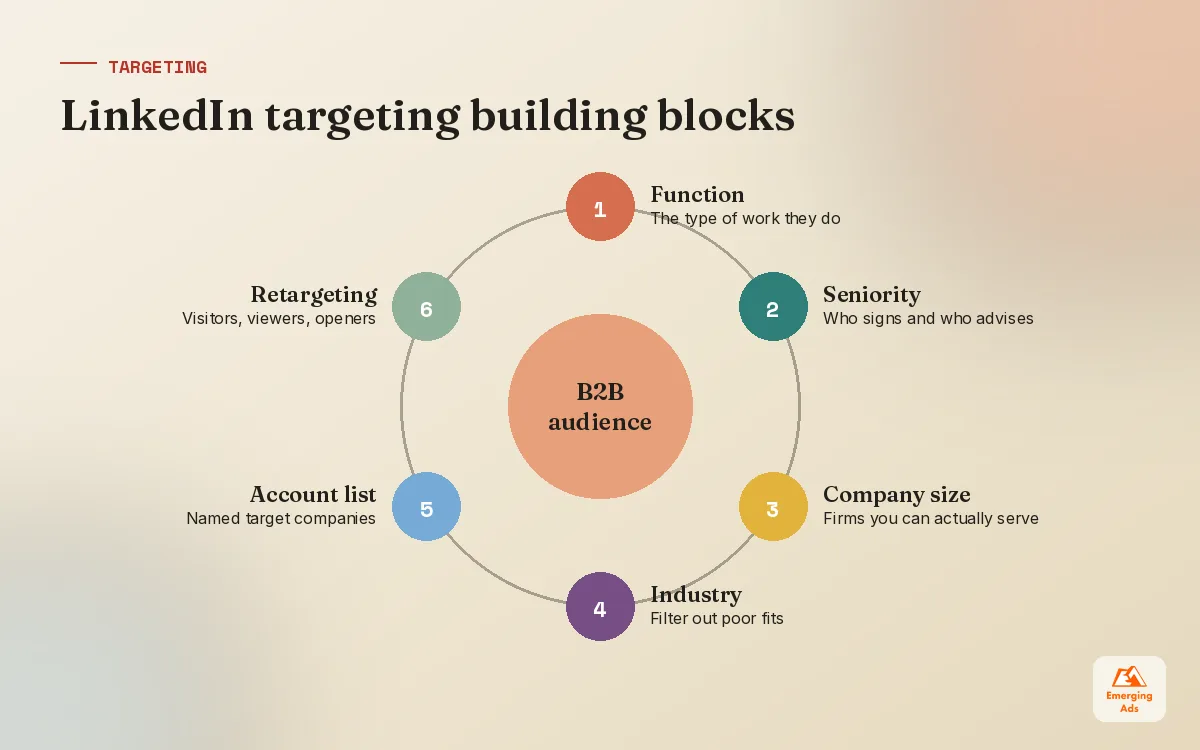
The targeting building blocks we use most
| Targeting option | Best for | Watch out for |
|---|---|---|
| Job function plus seniority | Reaching a role type at the right level across many companies | Can be broad, so pair it with industry or company size |
| Job titles | Very specific roles with consistent naming | Titles vary wildly between companies, so audiences miss people |
| Company lists (matched audiences) | Account based marketing and named target accounts | Lists need to be large enough to deliver |
| Industry and company size | Filtering out businesses you cannot serve | Industry labels are self selected and sometimes wrong |
| Skills and groups | Niche technical audiences | Often small and inconsistent, test before relying on them |
| Retargeting (site, video, forms) | Warm prospects who already know you | Small pools, so creative fatigue arrives quickly |
Our starting point for most B2B clients is job function plus seniority, narrowed by company size and geography. Job titles come second, because the same role can be called five different things. We also switch off audience expansion at the start so we can see how the core audience performs before letting LinkedIn widen it.
Audience size: the Goldilocks problem
Too narrow and campaigns barely spend, or show the same ad to the same fifty people until they are sick of it. Too broad and you pay premium prices to reach people who will never buy. LinkedIn shows an estimated audience size as you build, and we treat anything that looks tiny as a warning, especially for always-on campaigns. For deeper audience work tied to a specific industry, our LinkedIn B2B advertising setups usually split audiences by decision stage rather than cramming everyone into one.
On LinkedIn you are not buying clicks. You are buying the attention of a specific person at a specific company, so decide exactly who that person is before you spend.
03Choosing the right LinkedIn ad formats
LinkedIn offers a long menu of formats, and new clients often want to try them all at once. We would rather do two formats well than six badly. Most of the results in accounts we manage come from a small core set.
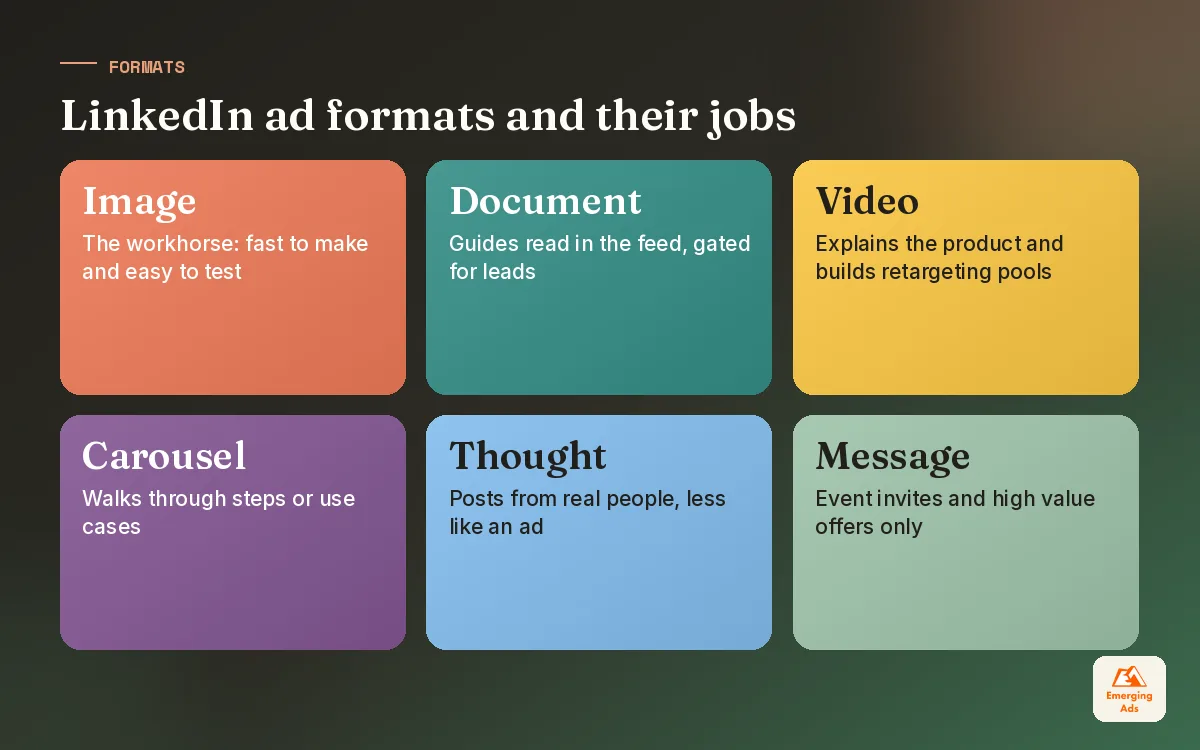
- Single image ads. The workhorse. Simple, fast to produce and easy to test. A clear headline and one strong visual do most of the work.
- Document ads. Let people read a guide or report inside the feed, with an option to gate the full version behind a form. Excellent for content led lead generation.
- Video ads. Useful for explaining a product, building familiarity and creating retargeting audiences of people who watched.
- Carousel ads. Good for stepping through a process or a set of use cases, though harder to produce well.
- Conversation and message ads. Can work for event invitations and high value offers, but easy to overuse. People notice when their inbox becomes an ad channel.
- Thought leader ads. Promote posts from real people at your company, often a founder or subject expert. They tend to feel less like ads because they are not.
Much of the feed-based work falls under LinkedIn sponsored content, and that is where we put the majority of budget for most clients. The content itself matters more than the format: specific, useful, slightly opinionated posts beat polished corporate messaging almost every time.
Creative that works for B2B buyers
B2B buyers are still people scrolling a feed between meetings. The ads that do well for our clients tend to name the reader’s problem in the first line, use real numbers or examples from the client’s own work, and ask for something proportionate. Asking a cold audience to book a demo is a big ask. Offering a useful benchmark, template or checklist is a small one.
04Lead gen forms vs landing pages
This is the decision that shapes most LinkedIn accounts. LinkedIn’s lead gen forms open inside the platform and pre-fill details from the member’s profile, so completing one takes a couple of taps. Landing pages take people to your site, where they read, think and fill in a form themselves.
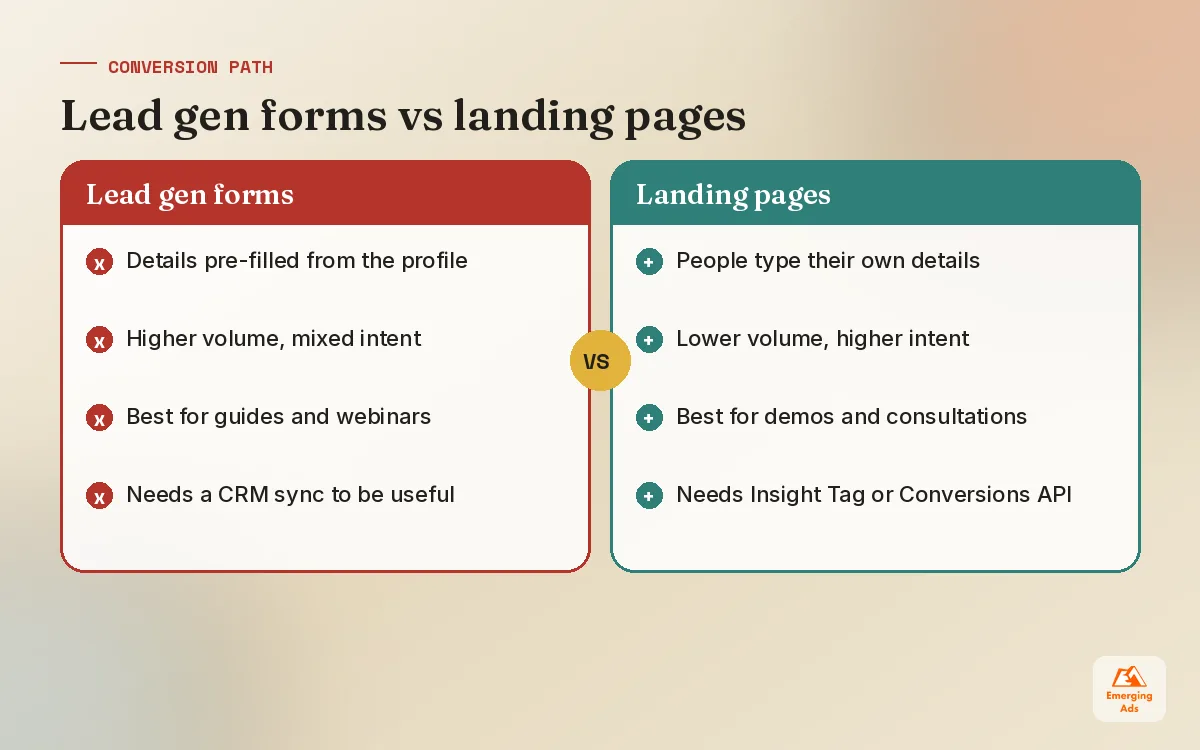
| Lead gen forms | Landing pages | |
|---|---|---|
| Friction | Very low, details are pre-filled | Higher, people type their own details |
| Volume | Usually higher | Usually lower |
| Intent | Mixed, some people submit on impulse | Generally higher, they chose to act |
| Tracking | Simple within LinkedIn, needs CRM sync | Needs the Insight Tag or Conversions API |
| Best offers | Guides, reports, webinars, templates | Demos, pricing, trials, consultations |
In practice we use both. Lead gen forms work well for top and middle funnel offers, where the goal is to start a relationship. Landing pages suit bottom funnel asks like a demo, where a little friction filters out tyre kickers. Our LinkedIn lead generation builds usually include a custom question on the form, such as company size or timeline, so sales can prioritise without an extra call.
05LinkedIn ads cost, budgets and bidding
LinkedIn ads cost more per click and per thousand impressions than Meta or most Google display inventory. Exact prices vary by audience, country, seniority and competition, so we avoid quoting a single figure. What we can say from the accounts we manage is that senior, narrow audiences in competitive industries are the most expensive to reach, and budgets that feel generous on Meta can look thin on LinkedIn.
How we set a starting budget
- Estimate a realistic cost per lead for your audience from past data or a short test.
- Decide how many leads a month you need to learn anything useful, not just the number you would like.
- Multiply, and check that each campaign gets enough of that budget to spend steadily every day.
- Keep campaigns few. Three well-funded campaigns beat ten starved ones.
Bidding options, in plain language
LinkedIn offers automated bidding, where the platform aims to get the most results for your budget, and manual or cost cap style bidding, where you set limits. We usually start with automated bidding to see what the market charges, then move to manual bids on campaigns with very expensive audiences once we understand the numbers. Manual bids set too low often mean the campaign barely delivers, so we raise them in steps rather than guessing.
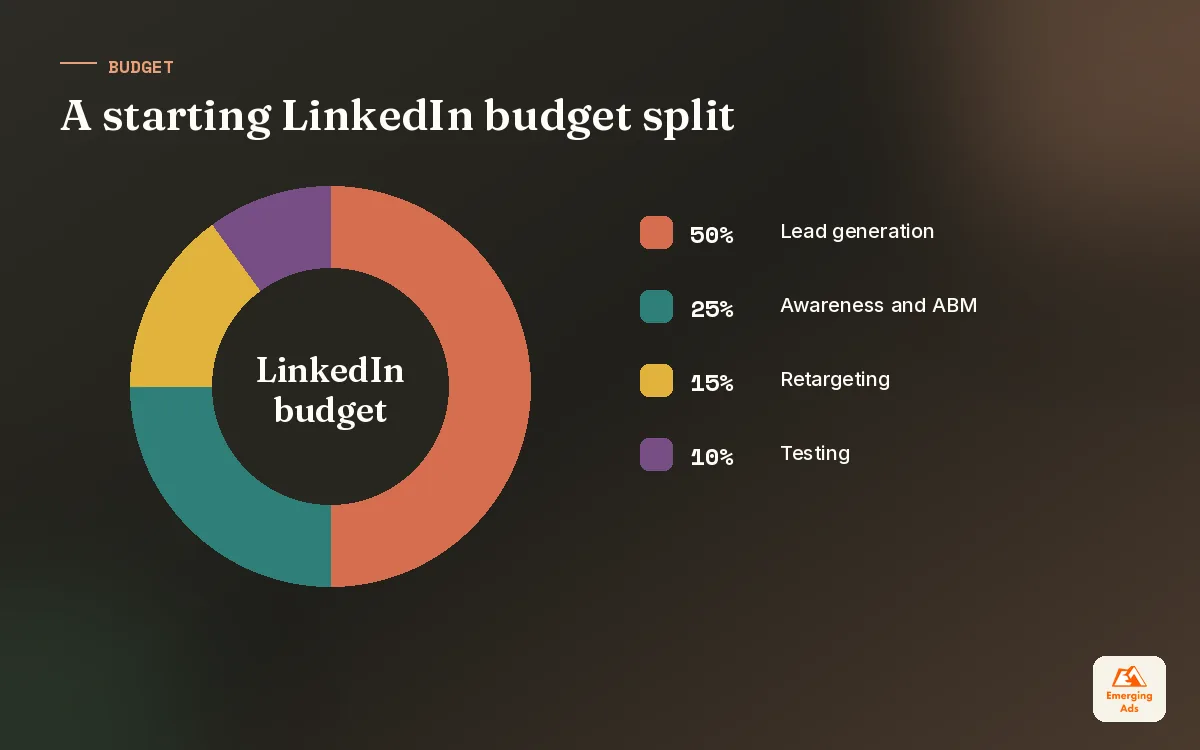
For software businesses, where trial or demo value is easier to model, the budget conversation is more precise. Our LinkedIn ads for SaaS plans tie spend directly to target cost per opportunity rather than cost per lead.
06Tracking linkedin ads properly
LinkedIn’s reporting is good at telling you who engaged: job functions, seniority, companies. It is weaker at telling you who became a customer, because that happens weeks later, in your CRM, often after a sales call. Closing that gap is where most of the value sits.
- Insight Tag. Install it across your site to track conversions on landing pages and build retargeting audiences.
- Conversions API. Send conversions from your server or CRM so LinkedIn sees outcomes the browser misses, including offline stages like qualified opportunities.
- UTM parameters. Tag every ad so your analytics and CRM record where each lead came from.
- CRM sync. Connect lead gen forms to your CRM so leads arrive instantly, not in a weekly CSV export.
If the plumbing between LinkedIn, your site and your CRM is patchy, fix that before scaling. A proper conversion tracking setup lets you see which campaigns produce pipeline, not just form fills, and it gives LinkedIn better signals to optimise against.
07What happens after the click: CRM follow-up and nurture
We have seen well built LinkedIn campaigns fail for one reason: nobody called the leads. Or somebody called them eight days later, when the prospect had forgotten downloading anything. Speed matters enormously in B2B. A lead contacted the same day remembers you. A lead contacted next week often does not.
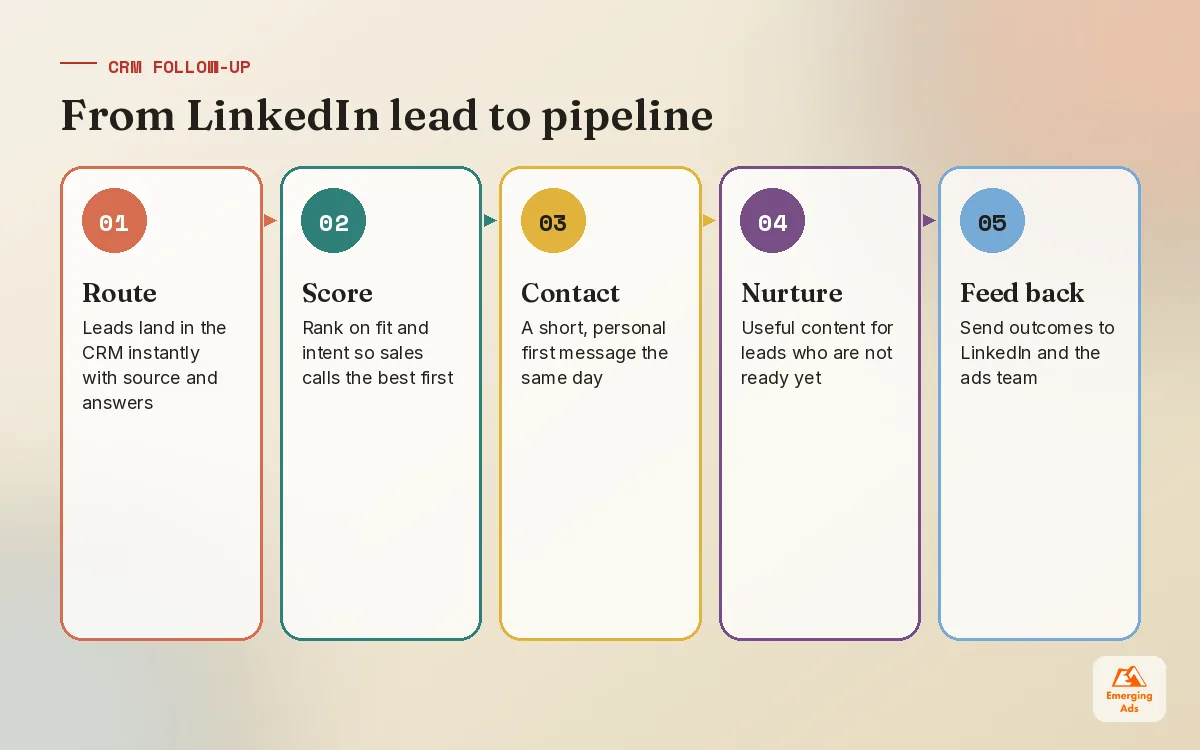
Our follow-up rules for clients
- Route every lead into the CRM automatically, with source, campaign and form answers attached.
- Score leads on fit (company size, role) and intent (which offer they took) so sales calls the best ones first.
- Send a short, personal first email within hours, not a generic brochure.
- Put leads who are not ready into a nurture sequence with useful content, not a string of ‘just checking in’ messages.
- Report back to marketing which leads became opportunities, so the ads team can adjust targeting and offers.
For smaller teams, a straightforward HubSpot CRM setup handles most of this without much complexity. Pair it with sensible lead nurture automation and the leads that are not ready today are still warm when they are ready in three months.
08Account based marketing on LinkedIn
Account based marketing (ABM) flips the usual approach. Instead of finding anyone who fits a profile, you pick the specific companies you want as customers and focus spend on the people inside them. LinkedIn is well suited to this because you can upload a list of target companies and reach employees at those companies by role and seniority.
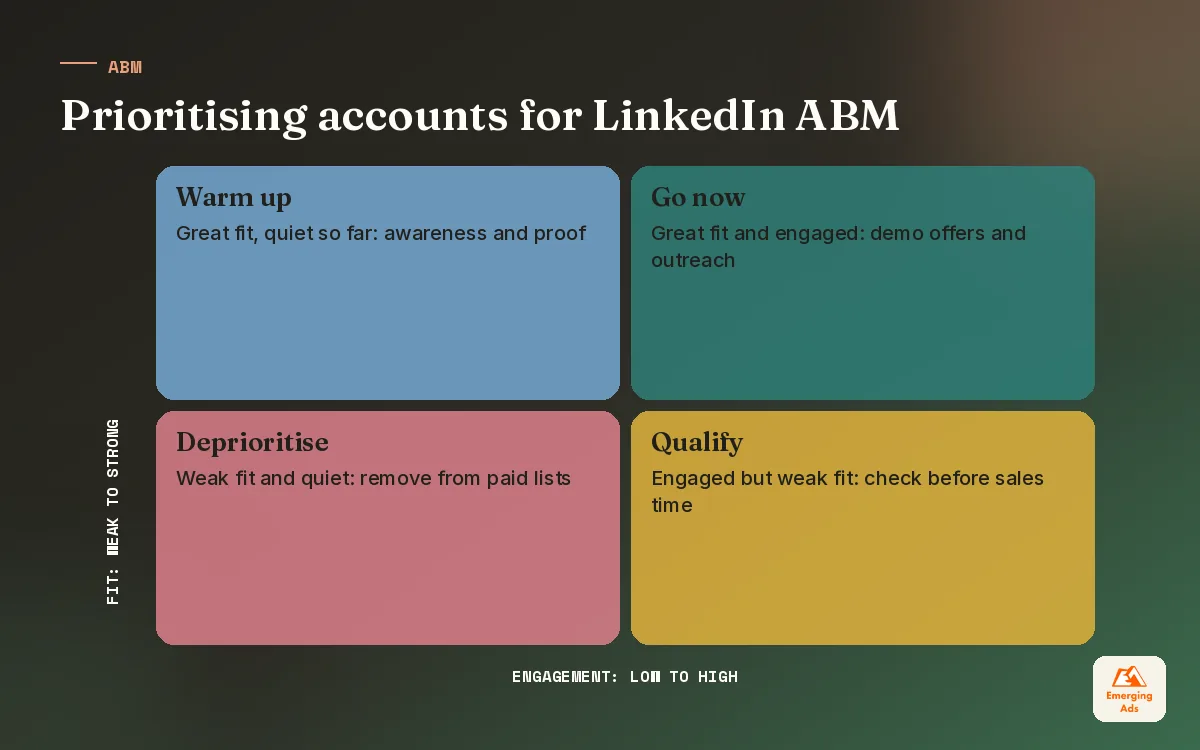
| ABM stage | What we run | What we measure |
|---|---|---|
| Awareness | Thought leader posts and short videos to the target account list | Reach and engagement by account |
| Consideration | Document ads and case studies to engaged accounts | Accounts with multiple engaged people |
| Conversion | Demo or consultation offers to the most engaged accounts | Meetings booked with target accounts |
| Sales support | Ads aligned with outreach the sales team is doing | Pipeline and deal velocity on target accounts |
ABM works best when marketing and sales agree on the list and talk weekly. It works poorly when marketing runs ads to a list sales has never seen. For SaaS clients with a defined ideal customer profile, this is often the core of our SaaS campaign management, with LinkedIn warming accounts before outbound outreach begins.
09How LinkedIn fits with Google and Meta
LinkedIn rarely works best alone. In most B2B accounts we manage, LinkedIn introduces the brand to the right people, Google Search captures them when they later look for a solution, and Meta retargets site visitors cheaply. If you are running those channels too, our Google Ads management guide and Meta ads management guide cover how we run each one, and why we plan budgets across all three together.
Our honest advice: start LinkedIn with a clear offer, a focused audience and a CRM that is ready to catch the leads. Give it enough budget and enough weeks to learn, and judge it on pipeline. If that sounds like what you need, the emergingadshq.com homepage explains how we work with B2B teams on linkedin ads and the channels around them.
Frequently asked questions
Straight answers to what clients ask us most about linkedin ads.
Are LinkedIn ads worth it for B2B?
How much do LinkedIn ads cost?
What is the minimum budget to test LinkedIn ads?
Should I use LinkedIn lead gen forms or a landing page?
Which LinkedIn targeting options work best?
How big should a LinkedIn audience be?
Which LinkedIn ad format performs best?
How do I track LinkedIn ads back to revenue?
How quickly should sales follow up on LinkedIn leads?
What is account based marketing on LinkedIn?
How long before LinkedIn ads show results?
Paying LinkedIn prices for leads sales will not call?
We will review your targeting, offers and CRM follow-up and show you where pipeline is leaking. You get a clear, prioritised list, not a sales pitch.
Book your free audit