The Practical PPC Management Guide We Hand to New Clients
Good PPC management is less about clever tricks and more about a steady, repeatable discipline: the right bid strategy for the data you have, budgets that follow results, and tests you can actually trust. This is how we run it across Google, Meta and LinkedIn.

Key takeaways
- PPC management is a cadence, not a campaign launch. Daily checks, weekly optimisation, monthly budget moves and quarterly strategy.
- Match the bidding strategy to the data you have. Automated bidding needs steady, reliable conversions to work well.
- Set budgets from target cost per result and expected volume, then move money monthly towards what is working.
- Test one meaningful thing at a time, give it enough data, and write down what you expected before you look.
- Judge every platform on the same business outcome, and leave changes alone long enough to see their real effect.
01What PPC management really is (and the part most people skip)
PPC management is the ongoing work of deciding how much to bid, how much to spend, where to spend it and what to test next, across every paid platform you run. Building campaigns is the easy bit. The hard part is the week after week discipline of making small, sensible changes, resisting big emotional ones, and knowing which numbers should move a decision.
We inherit a lot of accounts. The pattern is familiar: a burst of activity at launch, a flurry of changes when results dip, then long quiet stretches where nobody touches anything. Bids get changed on a Monday because the weekend was slow. Budgets get cut the day before a campaign would have exited its learning period. Tests run for four days and get declared winners. None of that is laziness. It is what happens when there is no system.
This guide is that system. It is deliberately cross platform, because the same principles of bidding, budget pacing and testing apply whether you are running Google Search, Meta prospecting or LinkedIn lead gen. For the Google specific operating rhythm, see our Google Ads management guide. Here we focus on the levers underneath all of them.
The three levers you actually control
- Bids. Usually through a bidding strategy and its targets rather than manual bids on each keyword.
- Budgets. How much each campaign and each platform can spend, and how that changes over the month.
- Inputs. Audiences, keywords, creative, landing pages and the conversion data you feed the algorithm.
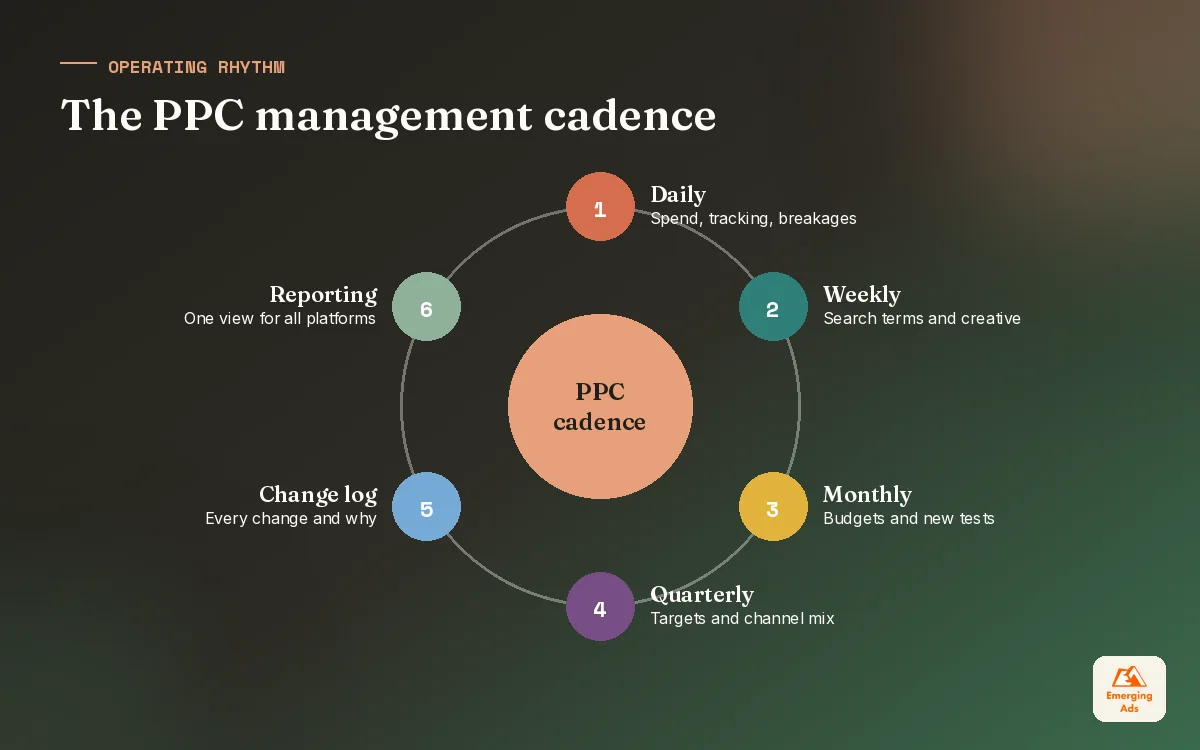
02The PPC management cadence: daily, weekly, monthly, quarterly
The most useful thing we give a new client is a calendar. Every task in PPC account management has a natural frequency. Do it more often than that and you create noise. Do it less often and waste builds up quietly.
| Frequency | What we check | What we are allowed to change |
|---|---|---|
| Daily (10 minutes) | Spend versus pacing, disapprovals, tracking alerts, anything broken | Fix breakages only. No bid or target changes. |
| Weekly | Search terms, placements, creative performance, audience overlap | Negatives, pausing clear losers, small target nudges |
| Monthly | Performance by campaign and platform against targets | Budget reallocation, new tests, structure changes |
| Quarterly | Business goals, margins, seasonality, channel mix | Targets, strategy, which platforms get investment |
The rule in the right hand column is the important one. Daily checks exist to catch broken things, such as a tracking tag that stopped firing or a payment that failed, not to react to a slow Tuesday. Most daily swings in cost per result are noise, and changing bids in response teaches the algorithm nothing useful.
Writing it down
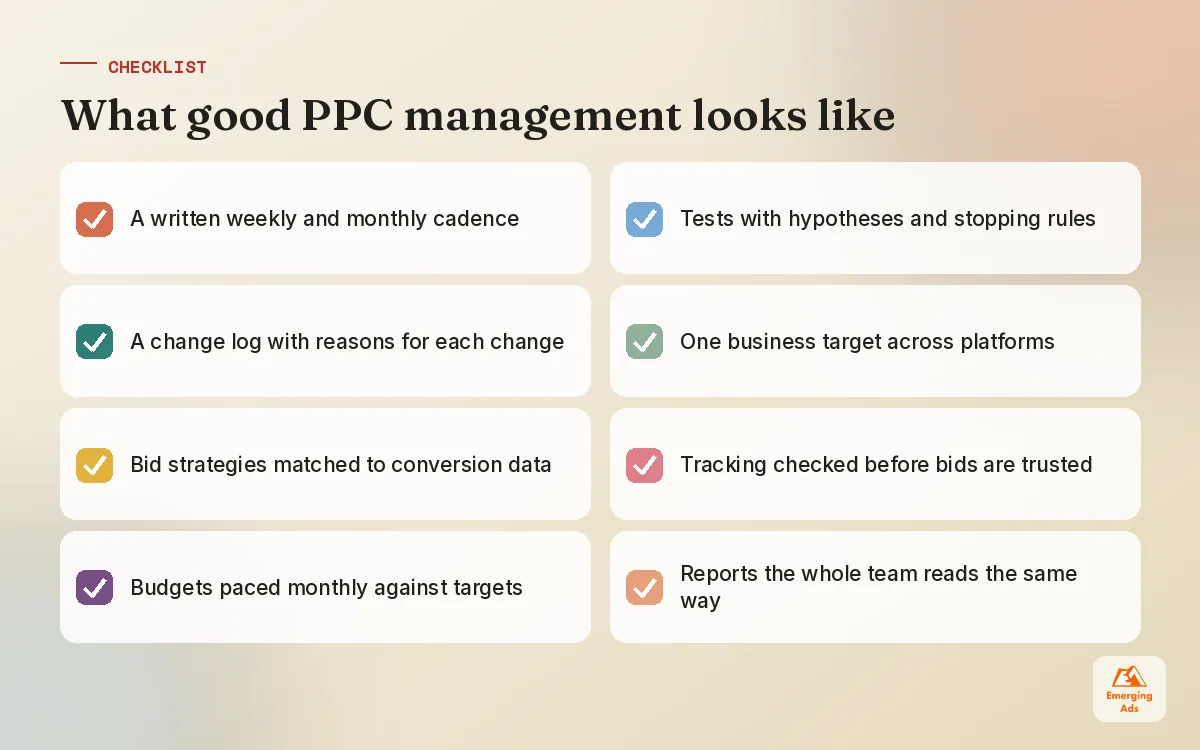
We keep a simple change log for every account: date, what changed, why, and what we expect to happen. It takes a minute per entry. Three months later, when someone asks why cost per lead dropped in May, the answer is there rather than in somebody’s memory. It also stops two people making conflicting changes in the same week.
03Choosing PPC bidding strategies on each platform
Every major platform now pushes automated bidding, and for good reason: the algorithms see signals no human can, such as device, time, location and browsing context, at the moment of each auction. But automated bidding is only as good as the conversions you feed it. With thin or unreliable data, it optimises confidently towards the wrong thing.
| Platform | Learning or volume strategies | Target based strategies | When we use manual or caps |
|---|---|---|---|
| Google Ads | Maximise conversions, Maximise conversion value | Target CPA, Target ROAS | Very new accounts, tiny budgets, brand campaigns needing tight cost control |
| Meta ads | Highest volume or highest value | Cost per result goal, ROAS goal | Bid caps for experienced buyers with stable data |
| LinkedIn ads | Maximum delivery | Cost cap | Manual bidding for small, niche audiences |
A simple progression that works
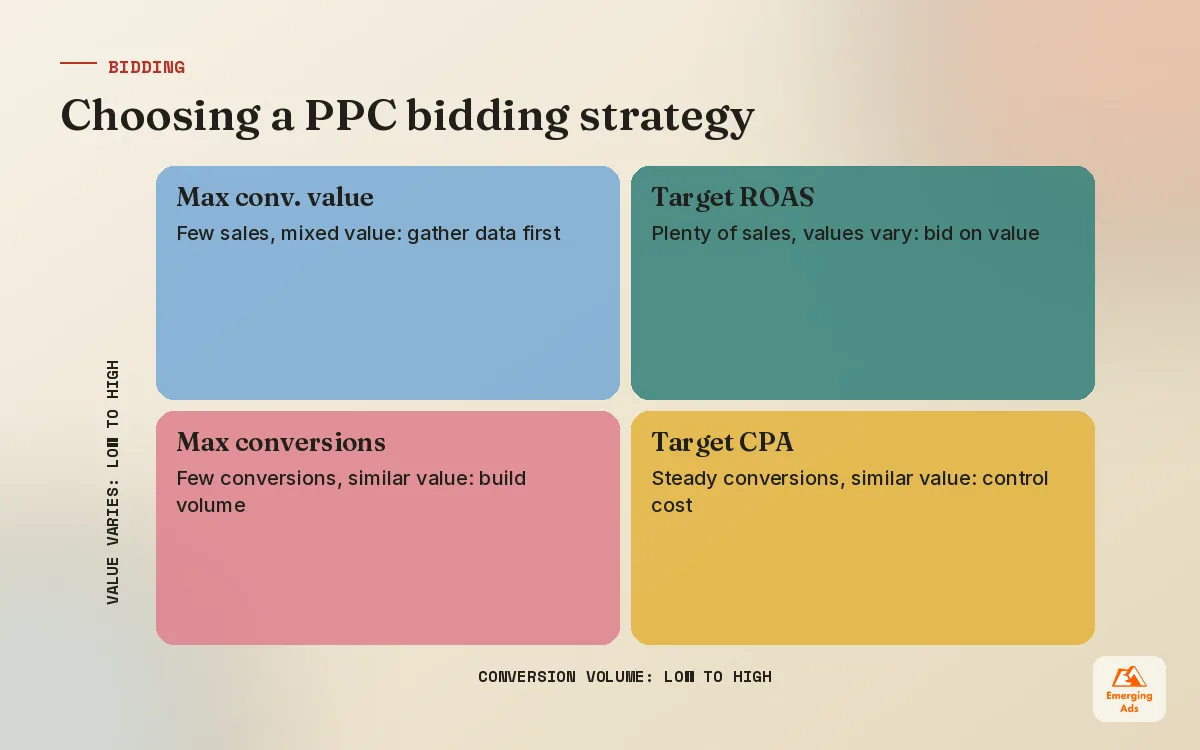
For a new campaign with little history, we usually start with a volume strategy so the platform can gather data, with a sensible daily budget as the safety net. Once conversions are steady and tracking is trustworthy, we move to a target based strategy, setting the first target close to what the campaign is already achieving rather than where we wish it were. Then we tighten gradually. Google recommends a reasonable volume of recent conversions before switching to Target CPA or Target ROAS, and in our experience the more steady the flow, the better target bidding behaves.
Where automated bidding goes wrong
- Optimising to the wrong event. Page views or add to basket counted as conversions, so the algorithm finds people who click but never buy.
- Targets set from hope. A Target CPA half the current cost starves the campaign of volume.
- Too many small campaigns. Splitting data across ten campaigns means none of them learns properly.
- Constant target changes. Each big change resets some of what the system has learned.
The matrix below is how we decide, in practice, for each campaign. The two questions are how much conversion data it has and how much the value of each conversion varies.
04PPC budget management: setting, splitting and pacing
Budgets should come from maths, not from last year’s figure plus ten percent. We start from what the business needs: how many leads or sales, at what cost per result. Multiply the two and you have a working monthly budget. Then we sense check it against how much demand exists on each platform.
| Step | Example (illustrative) | Why it matters |
|---|---|---|
| Target cost per lead | 60 | From close rate and customer value, agreed with sales |
| Leads needed per month | 80 | From the sales target and pipeline maths |
| Working monthly budget | 4,800 | Target cost multiplied by volume needed |
| Split by platform | Google 60%, LinkedIn 25%, Meta 15% | Based on where intent and audience sit for this business |
| Reserve for testing | Around 10% of total | So experiments do not steal from proven campaigns |
The figures are illustrative. The logic holds for any business: if the budget the maths demands is far bigger than what you can spend, the targets or the expectations need to change, not the arithmetic.
Pacing through the month
Google campaigns can spend more than the daily budget on busy days and less on quiet ones, balancing out across the month. Meta and LinkedIn behave differently again. So we pace against the monthly figure, not each day. A campaign that is behind pace by mid month with good results gets more room. One that is ahead of pace with poor results gets trimmed. We never make budget cuts during a campaign’s first learning phase unless something is clearly broken.
Moving money between platforms
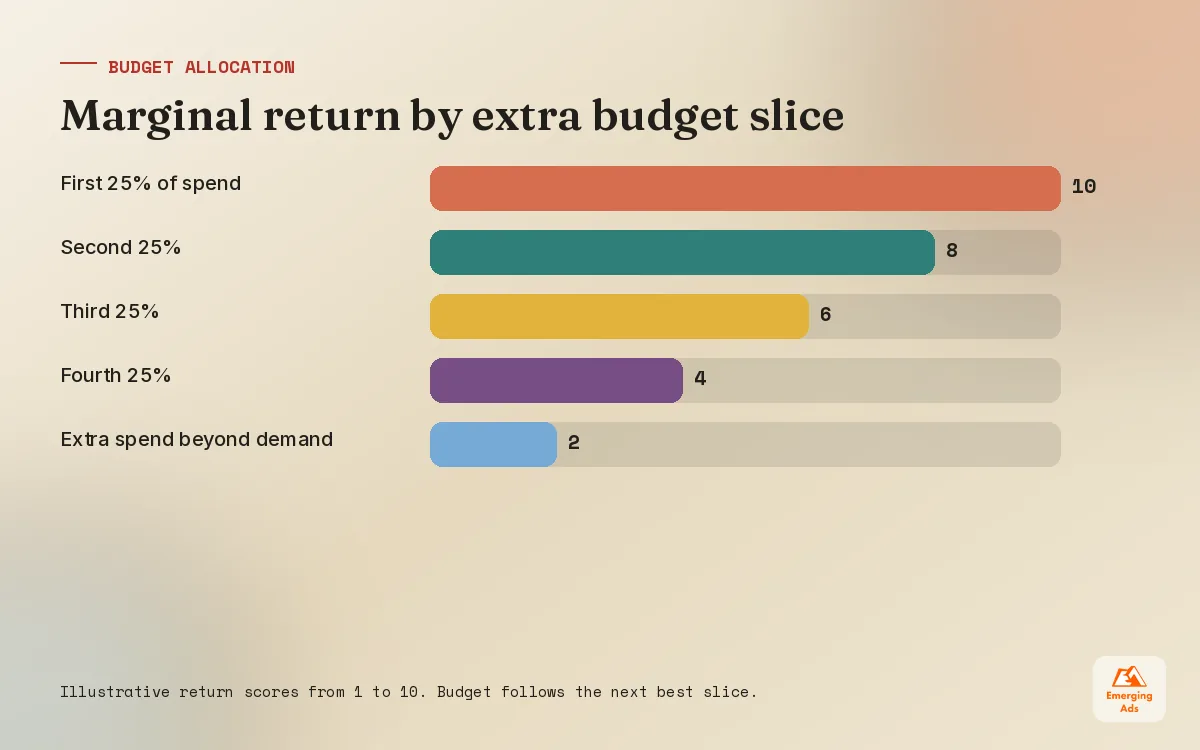
Once a month we look at the marginal return of each platform, meaning what the last slice of spend delivered, not the average. A platform with a great average cost per lead may already be saturated, while another with a worse average may still have cheap volume available. Budget follows marginal return. This is where our attribution modelling work earns its keep, because platform reports alone will always overstate their own role.
05Testing without fooling yourself
Almost every account we audit has run tests. Very few have learned anything from them. The usual reasons are testing too many things at once, stopping too early, and deciding what the result means after seeing it.
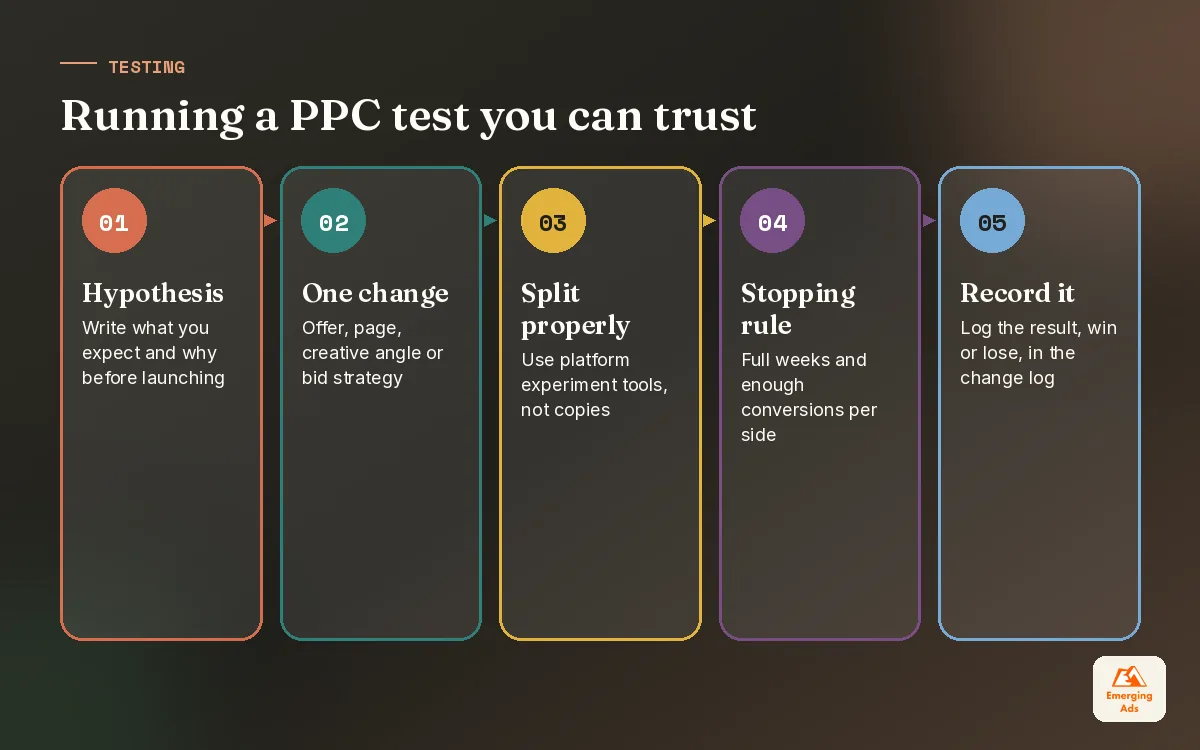
- Write the hypothesis first. “A price led headline will lower cost per lead because our buyers compare on price.” If you cannot write this sentence, you are not ready to test.
- Change one meaningful thing. A new offer, a different landing page, a new bidding strategy. Not a comma in a headline.
- Use the platform’s experiment tools where possible. Google experiments and Meta A/B tests split traffic properly, unlike duplicating a campaign and hoping.
- Agree the stopping rule before launch. A minimum run time covering full weeks and a minimum number of conversions per side.
- Record the result, win or lose. A losing test that tells you something about your buyers is valuable. Put it in the change log.
What is worth testing first
Test the things with the biggest possible effect before the small ones. In rough order, we test offers and landing pages, then creative angles, then audiences or keyword themes, and only then bidding strategies and fine details. A stronger landing page can change the economics of a whole account; our landing page design team often delivers the biggest wins we see in a quarter.
06Which numbers should drive PPC management decisions
Platforms give you hundreds of metrics. Most are diagnostic, useful for explaining a problem, not for deciding what to do. We separate the numbers that steer decisions from the ones that explain them.
| Metric | Type | How we use it |
|---|---|---|
| Cost per qualified lead or sale | Decision | The main target for most campaigns |
| Revenue or pipeline per pound spent | Decision | Budget allocation between campaigns and platforms |
| Conversion rate | Diagnostic | Tells us whether the landing page or offer is the problem |
| Click-through rate | Diagnostic | Signals creative or keyword relevance issues |
| Cost per click | Diagnostic | Context for competition, rarely a goal on its own |
| Impression share or frequency | Diagnostic | Whether there is room to scale or signs of fatigue |
The decision metrics depend on tracking that reflects real business outcomes. If your leads are judged in a CRM weeks later, feed that quality back to the platforms where you can. A clean GA4 setup gives you a neutral view across channels, and a shared Looker Studio dashboard means the client and our team read the same numbers every week instead of arguing about whose report is right.
Leading and lagging signals
For businesses with long sales cycles, the final sale can arrive months after the click. We track leading signals, such as qualified leads or booked calls, for weekly decisions, and check them against lagging signals, such as closed revenue, every quarter. If the two stop agreeing, the leading signal needs redefining.
07Running PPC management across Google, Meta and LinkedIn together
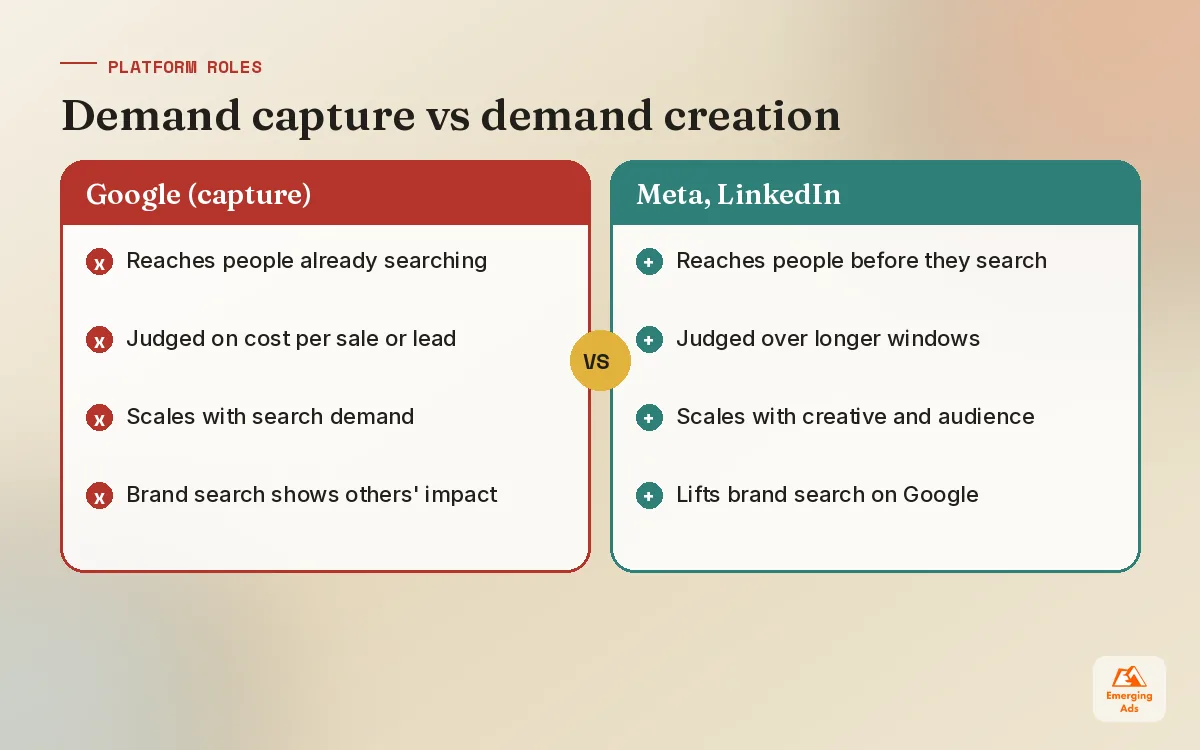
Most clients run at least two platforms. The trap is managing each as its own island, with separate targets, separate reports and nobody asking how they work together. A buyer might see a LinkedIn ad, search your name on Google a week later and convert. Each platform claims the sale. Neither is wrong, and neither tells the whole story.
- Give each platform a role. Google usually captures existing demand. Meta and LinkedIn usually create it. Judge them against that role.
- Use one business target. Cost per qualified lead or blended return on spend, measured the same way everywhere.
- Watch brand search. When prospecting on Meta or LinkedIn works, branded searches on Google often rise. That is part of their contribution.
- Review together. One monthly review covering every platform, so budget can move between them freely.
Our Meta ads management and LinkedIn ads service teams sit in the same reviews as our Google specialists for exactly this reason. For platform specific detail, our LinkedIn ads guide covers B2B bidding and audience sizes, and our ecommerce PPC guide shows how the same principles apply to online stores with margin based targets.
08In-house, freelancer or agency PPC management
There is no single right answer. An in-house marketer who knows the business deeply can do excellent PPC management if they have the time and the platform experience. A freelancer can be great for a single platform. An agency makes most sense when you run several platforms, spend enough that small percentage gains matter, or need specialists in tracking and creative as well as buying.
Whoever runs it, ask them to show you their cadence, their change log and their test history. If they cannot, the account is probably being managed by reaction. Before handing over any account, we usually start with a Google Ads audit or a Facebook ads audit, so both sides agree on the starting point and what good looks like.
Most accounts do not need a genius. They need someone who turns up every week, changes the right few things and leaves the rest alone.
If you want a team to run this rhythm for you, our Google Ads service is where most clients start, and you can see every platform we manage on our services page. For more practical guides like this one, browse the EmergingAds HQ blog.
Frequently asked questions
Straight answers to what clients ask us most about ppc management.
What does PPC management include?
How often should a PPC account be optimised?
Which bidding strategy should I use in Google Ads?
How do I decide my PPC budget?
Why should I not change bids every day?
How long should a PPC test run?
What is budget pacing in PPC?
How do I manage PPC across several platforms?
Is manual bidding ever better than automated bidding?
What metrics matter most in PPC management?
Should I hire an agency for PPC management?
Want a second pair of eyes on your bids and budgets?
We will review your bidding strategies, budget pacing and testing setup across every platform you run, and tell you plainly what we would change first.
Book your free audit