Google Search Ads: The Practical Guide We Hand to New Clients
Google Search ads are still the closest thing paid media has to a customer raising their hand. This is the playbook we use to turn that hand-raise into leads and sales, without paying for every stray query on the internet.
Key takeaways
- Google Search ads work because the buyer tells you what they want; your job is to only pay for the queries that match what you sell.
- Group keywords by intent and value before you think about volume, and give your best intent its own budget.
- Broad match can work well with solid conversion data and smart bidding; without that data it mostly finds new ways to waste money.
- A responsive search ad is a set of ingredients, not a finished ad, so write headlines that make sense in any combination.
- Search term mining every week, with a shared negative keyword list, is the single habit that separates tidy accounts from expensive ones.
01What Google Search ads are really for (and where they stop working)
Google Search ads put your text ad in front of someone at the exact moment they type a problem into Google. That is the whole appeal. A plumber gets the person searching for an emergency callout at 11pm, a SaaS company gets the operations lead comparing tools, a clinic gets the patient looking for an appointment this week. Nobody had to be interrupted. They asked, and you answered.
In accounts we manage, Search is usually the most efficient channel for demand that already exists, and the least useful channel for demand that does not. That second part matters. If nobody searches for what you sell, because the category is new or the product is an impulse buy, Search will not create that demand for you. It will just show you very small numbers and a high cost per click. In those cases we lean on Meta, YouTube or LinkedIn to build interest first, and use Search to catch the people who come looking afterwards.
Where Search fits inside a wider Google account
We treat Search as the part of the account you control most tightly. Performance Max, Demand Gen and Display all hand more of the decisions to Google. Search still lets you choose the words, write the message and decide where the click lands. That control is why we usually build Search first for new clients, and why our Google Search ads management work starts with a keyword and landing page review rather than a campaign build. If you want the wider operating rhythm around it, our Google Ads management guide covers how Search sits alongside the other campaign types.
02Building your Google Search ads keywords from intent, not volume
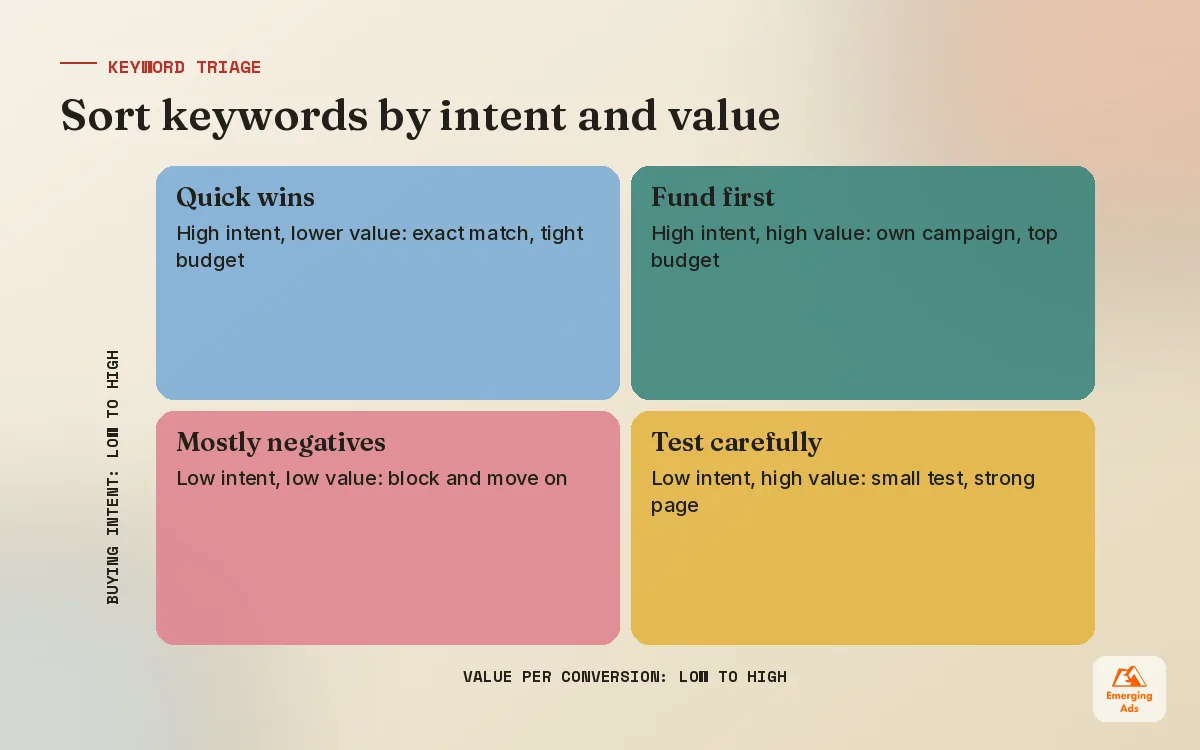
The most common mistake we see in new accounts is a keyword list built from a tool export sorted by search volume. Big numbers feel safe. They are usually the vaguest terms in the category, full of researchers, students, job seekers and people who wanted something slightly different. A term with a fraction of the volume and a clear buying signal almost always pays back better.
So we sort by intent first. We read every candidate term and ask one question: if this person clicked, what are they hoping to do in the next five minutes? Then we sort into four buckets and only then look at volume and cost per click. Our keyword research service follows the same order, because the order is what makes the list useful.
| Intent tier | Typical wording | What we do with it |
|---|---|---|
| High intent, high value | “near me”, “price”, “book”, “quote”, product plus model | Own campaign, first claim on budget, exact and phrase match |
| Comparison | “best”, “vs”, “alternative to”, “reviews” | Separate ad group, comparison landing page, watch cost per lead closely |
| Problem aware | “how to fix”, “why is my”, symptoms | Test small, only where the fix is your service |
| Research or job seeking | “what is”, “course”, “salary”, “free” | Usually negatives, not keywords |
Use real language, not industry language
Your team calls it “managed IT services”. Your customers type “computer support for small office”. Sales call notes, support tickets, reviews and your own site search are better keyword sources than any tool, because they show the words buyers actually use. Tools are still useful for checking volume and spotting gaps, and competitor tools such as SpyFu competitor research help you see which terms rivals have been paying for over a long period, which is a decent sign those terms convert for someone.
03Match types: how we actually use them now
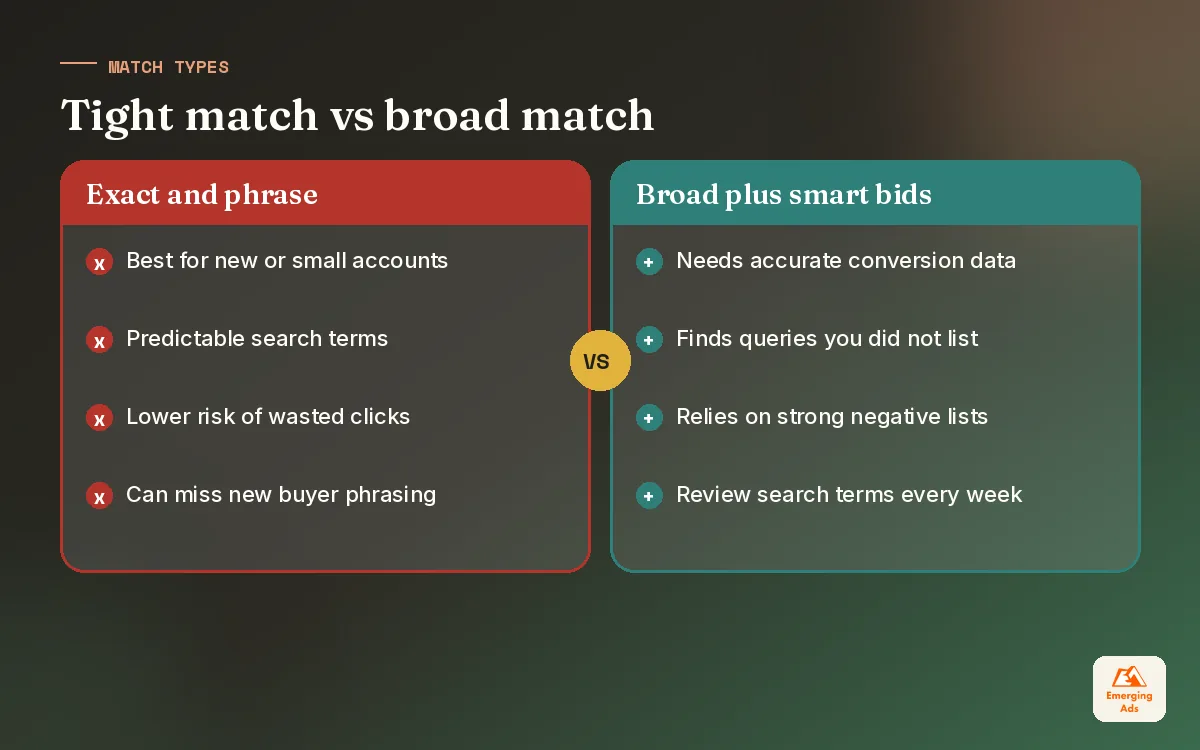
Match types used to be precise instructions. Today they are closer to strong hints. Exact match can show for close variants with the same meaning, phrase match can show for searches that include the meaning of your phrase, and broad match can show for anything Google judges to be related. That does not make match types pointless. It means you choose them based on how much data your account has and how much you trust the bidding.
| Match type | When we use it | Main risk | What keeps it honest |
|---|---|---|---|
| Exact | Proven money terms, brand, tight budgets | Missing new phrasing buyers use | Periodic review of search terms for new winners |
| Phrase | Core services with a few common modifiers | Drift into related but wrong services | Service-level negative lists |
| Broad | Accounts with steady, accurate conversion data and smart bidding | Paying for loosely related queries | Strong negatives, value-based bidding, weekly term review |
For a new local business account with a modest budget, we usually start with exact and phrase only. There is not enough conversion data for broad match to learn from, and every wasted click hurts. For an established lead generation account with clean, tested tracking and a steady flow of conversions each month, we often run a broad match campaign alongside the exact campaign and let the results decide. Sometimes broad finds valuable queries we never would have guessed. Sometimes it just finds expensive ways to reach people who were never going to buy.
04Google Search ads campaign setup and structure that stays readable
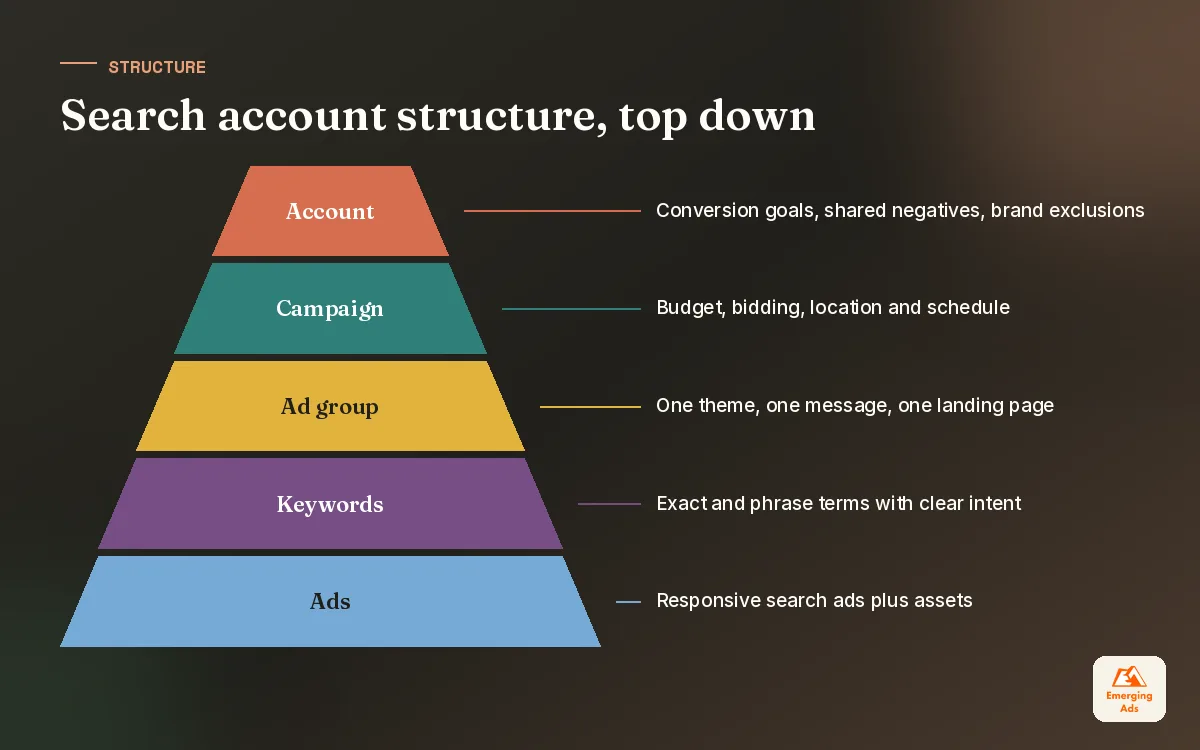
A good structure answers one question quickly: where is the money going, and is it working? Structures that answer that question are usually boring. Campaigns split by what needs its own budget, ad groups split by what needs its own message, and very little else.
- Brand campaign. Always separate. Brand clicks are cheap and convert well, and if they sit with non-brand terms they flatter the whole campaign and hide weak performance.
- Core service or product campaigns. One campaign per line of business that needs its own budget or has a very different value per conversion.
- Competitor campaign, if you run one. Separate budget, separate expectations, often a higher cost per lead that can still be worth it.
- Ad groups by theme. Tight enough that one landing page and one set of headlines fits every keyword inside. We stopped building single-keyword ad groups years ago; themed groups of closely related terms give the ads more data.
- Location and schedule. Set at campaign level, based on where you can actually serve customers and when someone can pick up the phone.
The two-budget test
Before splitting anything into a new campaign, we ask whether it needs a different budget or a different target. If the answer is no to both, it probably belongs as an ad group in an existing campaign. This one question stops most accounts from sprawling into forty campaigns that each spend too little to learn anything. When we take on messy accounts through a Google Ads audit, consolidating over-split campaigns is one of the fixes we make most often.
05Responsive search ads best practices that earn the click
A responsive search ad lets you supply up to 15 headlines and 4 descriptions, and Google assembles combinations for each auction. The mistake is writing it like one fixed ad. Headlines get mixed in any order, so each one needs to stand on its own and still read well next to any other.
We write headlines in roles. A few repeat the keyword theme so the ad feels relevant. A few carry the offer or the price signal. A few carry proof: years trading, review count if you can verify it, accreditations, guarantees. A few handle objections: no call-out fee, cancel anytime, same-day dispatch. Descriptions then expand on the most important two or three points and end with a clear next step.
Pinning: use it sparingly
Pinning forces a headline into a position. It is useful when something must always appear, such as a regulated disclaimer or a brand name, but every pin reduces the combinations Google can test. We pin only where there is a legal or brand reason, and we usually pin two or three alternatives to the same slot rather than one, so testing can still happen.
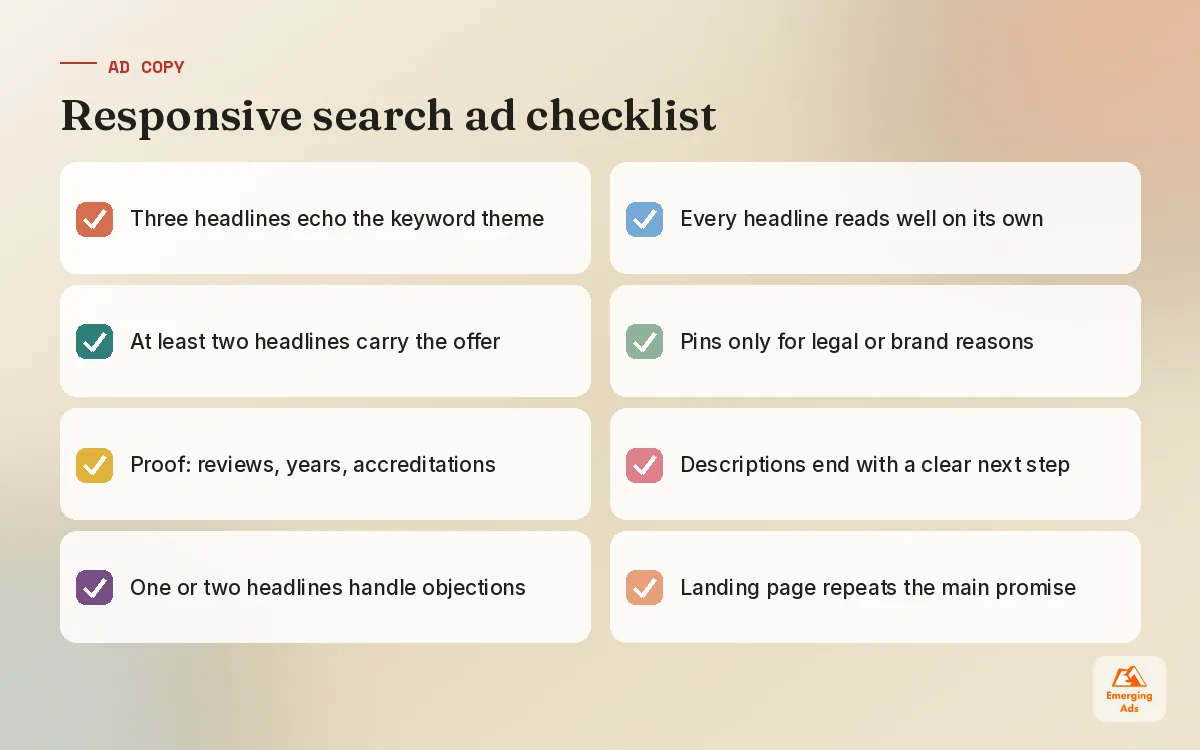
Write every headline as if it will be the only one the searcher reads, because often it is.
How we test ad copy
Asset-level performance labels give a rough signal, but they do not tell you what drives conversions. We prefer to test one idea at a time at the ad level: a price-led ad against a proof-led ad in the same ad group, run until each has a meaningful number of conversions, then judge on conversion rate and cost per conversion rather than click-through rate alone. A high click-through rate on an ad that promises something the page does not deliver is just an expensive way to disappoint people.
06Ad assets, landing pages and message match
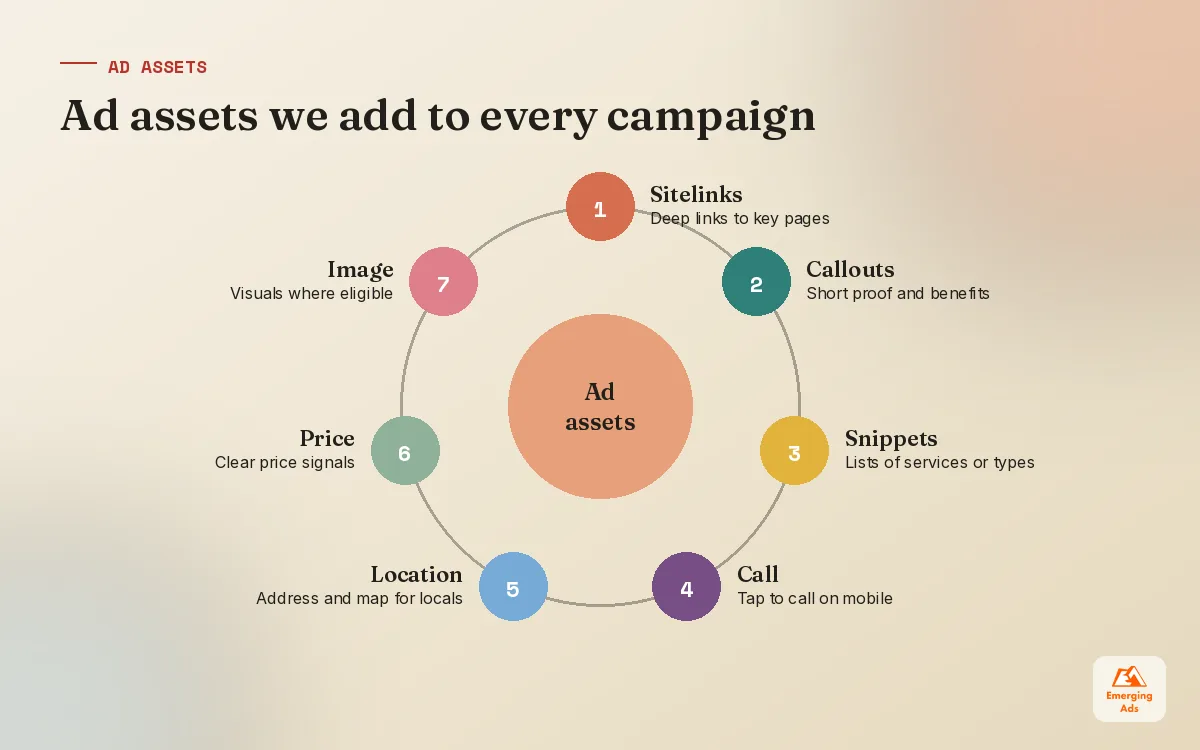
Assets (still called extensions by most people) make the ad bigger and more useful. Sitelinks, callouts, structured snippets, call assets, location assets, price assets and image assets where eligible. Google decides which to show in each auction, so supply plenty and keep them accurate. Out-of-date promotions and dead sitelinks quietly erode trust.
The bigger lever sits after the click. When the ad says “Same-day boiler repair in Leeds” and the page opens on a generic homepage with a slider, a lot of that intent drains away. We aim for a page where the headline repeats the promise of the ad, the next step is obvious on a phone without scrolling, and the proof sits right beside the form. Dedicated pages from our landing page design team often do more for cost per lead than any bid change, and ongoing conversion rate optimisation keeps them improving once traffic is flowing.
| Ad promise | Weak landing page | Matched landing page |
|---|---|---|
| Emergency repair, same day | Homepage with services list | Service page, phone number at top, today’s availability |
| Pricing from a set amount | Contact form with no price | Price table, what is included, then the form |
| Free consultation | Long about-us page | Short form, what happens next, calendar booking |
| Compare against a named rival | Generic features page | Honest comparison table with a clear reason to switch |
07Google Search ads negative keywords and search term mining
If there is one habit that separates tidy accounts from expensive ones, it is reading the search terms report every week. Keywords are what you bid on. Search terms are what people actually typed. The gap between the two is where money leaks, and it gets wider as match types loosen.
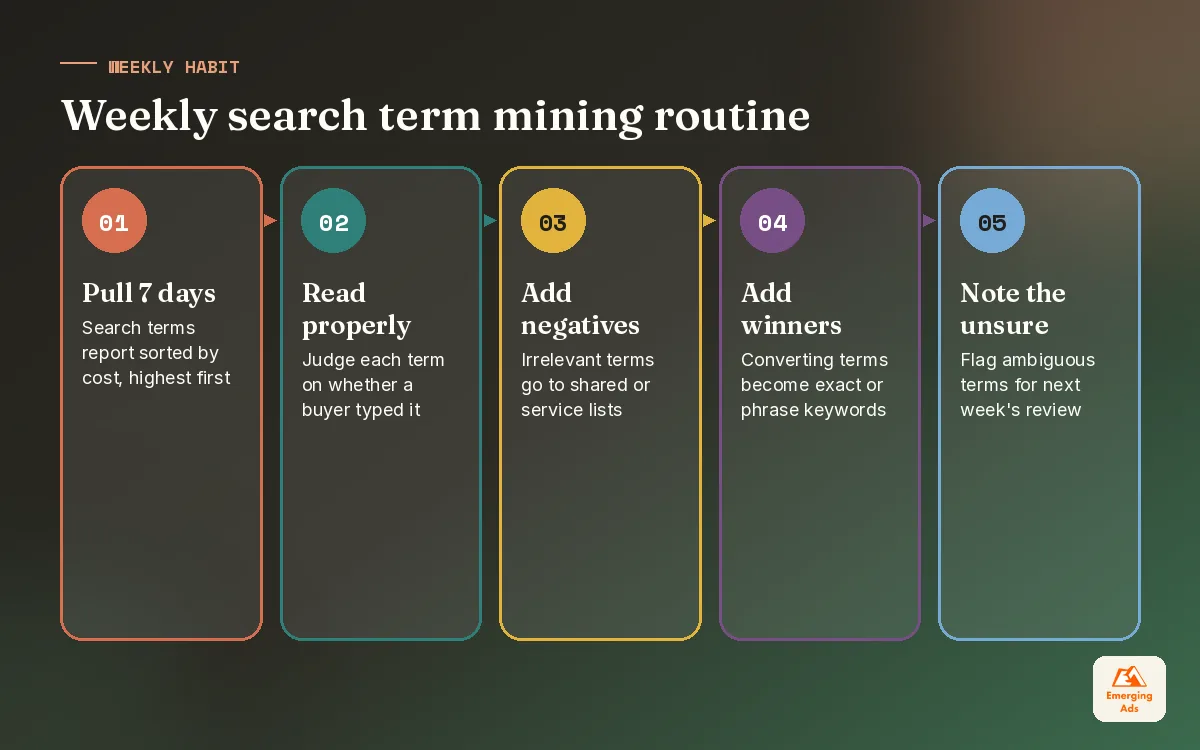
Our routine is simple and dull, which is why it works. Sort the last seven days of search terms by cost. Read the top of the list properly, not skim it. Anything irrelevant goes into a negative list. Anything that converted well and is not yet a keyword gets added to the right ad group. Anything ambiguous gets a note and a second look next week.
How we organise negatives
- Account-wide shared list. Jobs, careers, salary, free, DIY, course, training, and anything else that is never a buyer for this business.
- Service lists. Stop the plumbing campaign showing for electrical searches, and the reverse.
- Cross-campaign negatives. Keep brand terms out of non-brand campaigns so each campaign reports honestly.
- Location negatives. Town names you do not serve, which often slip in through broad and phrase match.
One warning: negatives are literal in a way positive keywords are not. They do not automatically cover plurals and variants in the way you might expect, so add the common variations yourself. And check each new negative against your keyword list so you do not accidentally block something you are paying to win.
| Cadence | Task | Time it takes (illustrative) |
|---|---|---|
| Weekly | Search terms by cost, add negatives and new keywords | 30 to 60 minutes per account |
| Monthly | Review shared lists, check nothing important is blocked | About 30 minutes |
| Quarterly | Full keyword and match type review against conversions | Half a day |
08Bidding, tracking and when to bring in help
Smart bidding only works as well as the conversion data behind it. If form spam, duplicate tags or page views are counted as conversions, Target CPA will happily find you more of them. Before we touch bidding on any account we check that each conversion action is real, counted once, and weighted by value where values differ. Our conversion tracking setup work exists because this step is where most accounts go wrong, and our Google Ads conversion tracking guide walks through the checks in detail.
For new campaigns we usually begin with Maximise Conversions or manual CPC with enhanced bidding to gather data, then move to Target CPA or Target ROAS once Google has seen a steady flow of conversions. Google recommends a reasonable volume of recent conversions before switching to target-based bidding, and in our experience jumping in earlier tends to produce erratic weeks. For lead generation accounts, importing offline outcomes such as qualified leads or booked jobs makes a big difference, and we build that into our Google Ads lead generation setups where the CRM allows it.
Signs it is time for outside eyes
- Cost per lead has crept up for three months and nobody can say why.
- The search terms report has not been opened in weeks.
- Every campaign runs on broad match and the conversion count looks too good to be true.
- You are a local business spending most of your budget outside the area you serve; our local business marketing team sees this one a lot.
If any of those sound familiar, a structured review is a good place to start. Our Google Ads audit guide lays out the checks we run, and you can see everything we offer on our services page. For more practical PPC writing from live accounts, the EmergingAds PPC blog homepage collects every guide in one place.
Frequently asked questions
Straight answers to what clients ask us most about google search ads.
What are Google Search ads?
How much should I spend on Google Search ads to start?
Should I use broad match keywords?
How many keywords should each ad group have?
How many headlines should a responsive search ad have?
What are negative keywords and why do they matter?
How often should I check the search terms report?
Why are my Google Search ads getting clicks but no leads?
Should I bid on my own brand name?
When should I move from Maximise Conversions to Target CPA?
Are Google Search ads worth it for local businesses?
Want to know which of your search terms are quietly burning budget?
Send us read access and we will pull your last 90 days of search terms, flag the waste and show you the keywords worth more budget. Plain English, no obligation.
Book your free audit